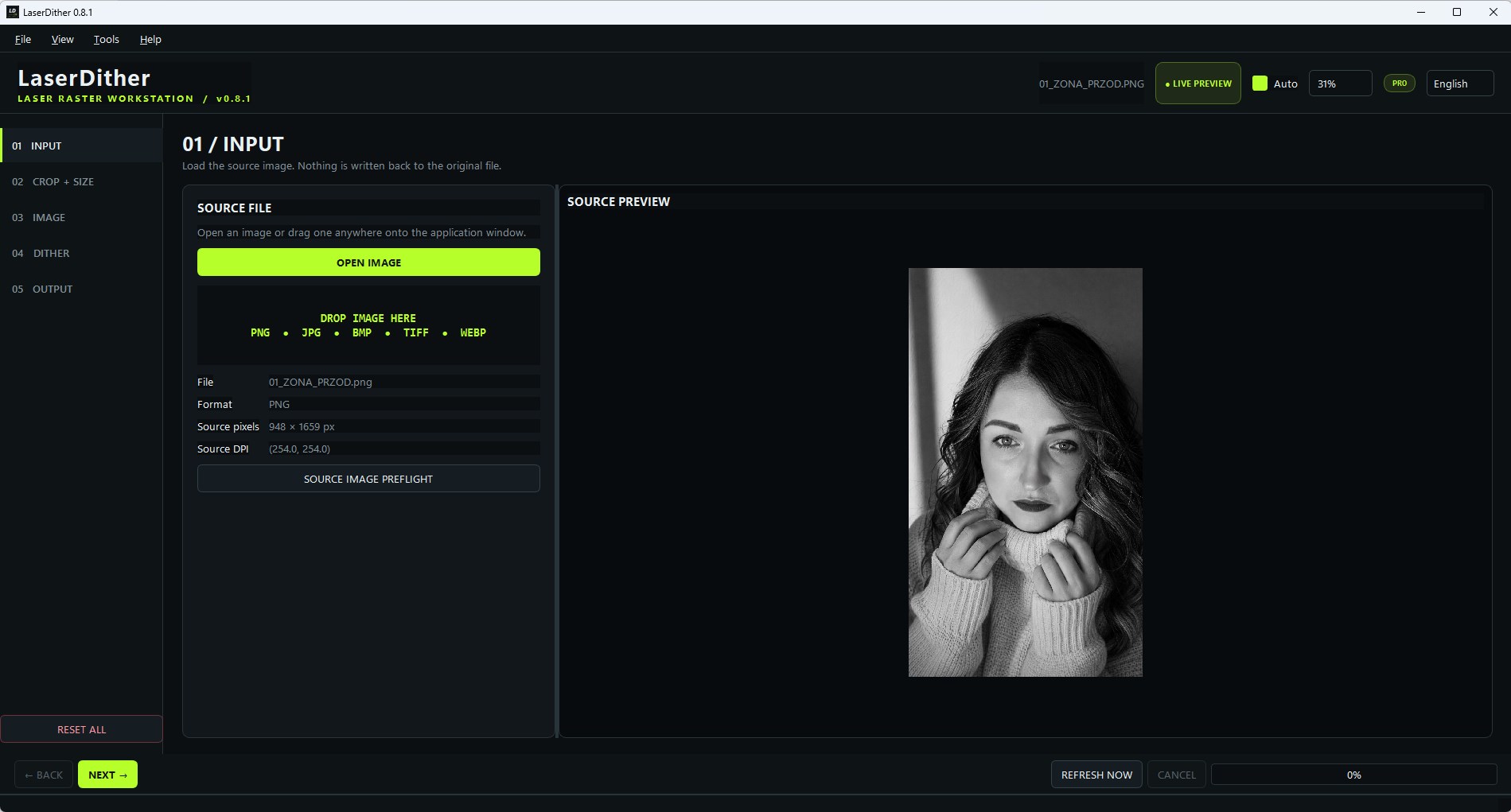
Turn photos into precisely sized, black-and-white artwork for laser engraving. Adjust the image, compare the dots and export a clean 1-bit raster for your laser software.
Local processing · Windows 10 / 11 · EN / DE / PL / FR / ES
LaserDither 0.9 is available in Microsoft Store, published on 7 October 2026.
REAL APP SCREEN · MICROSOFT STORE · LaserDither
THE FILE BEFORE THE MATERIAL
Control the pixels your laser will receive.
LaserDither prepares the artwork. Your laser software controls the machine. That keeps the preparation workflow clear, repeatable and independent of hardware.
01
Physical size, not guesswork.
Set millimetres and DPI. LaserDither calculates the exact target raster in pixels before export.
02
A controlled 1-bit result.
Choose the dithering algorithm, adjust tones and inspect a pixel-faithful preview before you export.
03
Workshop memory.
Store laser and material profiles so the preparation can be repeated instead of rebuilt from scratch.
A CLEAR FIVE-STAGE WORKFLOW
From source image to ready raster.
01
Input
Open PNG, JPG, BMP, TIFF or WebP and inspect source pixels.
02
Crop + size
Choose the crop, physical dimensions and required DPI.
03
Image
Adjust brightness, contrast, gamma, highlights and sharpness.
04
Dither
Select the dot algorithm, threshold, inversion and scan direction.
05
Output
Export validated 1-bit PNG, BMP or TIFF for your workflow.
FREE OR PRO
Try the PRO tools with a free annual license.
LaserDither
FREE · single-image preparation
Crop, physical sizing and DPI
Tone adjustments, dithering and 1-bit export
Source preflight, laser/material profiles and Troubleshooter
LaserDither
PRO · advanced workshop tools
Batch processing and Dither Lab comparison
Calibration Wizard, DPI/interval test and material response
Rotary/taper tools, job history and Expected vs Actual
WORKS WITH YOUR EXISTING SOFTWARE
Prepared for import — not machine control.
Use the prepared raster in LightBurn, LaserBurn, xTool Creative Space, LaserGRBL or another compatible workflow. Always verify the imported physical size and settings before starting the laser.
While we collect customer feedback to confirm that the applications work correctly in everyday use, we provide PRO licenses free of charge. Each license is valid for one year. Contact us to request a license and share your experience.
Import SVG and DXF parts, set sheet dimensions, margins and gaps, arrange complete sets and export the layout. You can adjust the arrangement manually.
01
One project. Complete sets.
Arrange a whole project, set quantities for individual patterns or repeat a complete kit. A six-part design × three sets means all 18 parts.
02
Keep each design intact.
Internal cutouts stay with their outer part. Each part can rotate independently, without mirroring or scaling.
03
See the area you actually use.
Compare utilization of the whole sheet with the bounding rectangle occupied by the layout.
Import and layout improvements
Version 0.9 asks about unclear units, improves DXF HATCH handling without losing curves, and fixes small gaps and contour closure. Set quantities per pattern or complete set, then review the layout before cutting.
FAQ
Before the first engraving.
Does LaserDither control my laser?
No. It prepares raster artwork for import into your laser software. It does not connect to or control laser hardware.
Is the image uploaded anywhere?
No. Image processing, profiles, calibrations and exports are handled locally on your Windows device. The app does not use advertising, analytics, tracking, telemetry or cloud image processing.
What does 1-bit mean here?
The exported image contains only black and white pixels — no alpha channel and no gray pixels. The dots are created by the selected dithering algorithm.
What is included in the free version?
The free core workflow covers preparation of a single image: crop, sizing, adjustments, dithering, source preflight and 1-bit export. Advanced calibration, comparison, batch and notebook functions are optional PRO tools.
How long does the free PRO license last?
The license is annual, not lifetime. We currently provide it free of charge while gathering customer feedback. Contact us for a license; future pricing and renewal terms will be communicated separately.